Wi-Fi Connected but No Internet? Fixes for Android, iPhone and Windows 11

First find out whether the problem is one device or every device on the same Wi-Fi. If every device has no internet, it is the router or your internet provider: check for an outage and restart the modem and router.

If only one phone or laptop has no internet while others work, fix that device: turn Wi-Fi off and on, forget the network and rejoin it, check VPN and date settings, then restart it.

By , maker of TalkFixAI · Published · Updated

One device or every device? Start there

  1. Step 1: Check if it is one device or all of them

    Open a website on a second phone or laptop connected to the same Wi-Fi. Make sure the second phone is not quietly using mobile data. If both fail, go to the router steps. If only one device fails, skip ahead to the device steps.

  2. Step 2: Every device: check for an outage, then restart the modem and router

    Use mobile data to check your provider's outage page or app. If there is no outage, unplug the modem and router (or the single combined box) for 30 seconds, plug the modem in first, wait for its lights to settle, then plug in the router and give it two minutes. If a light is red, see Router showing a red light?

  3. Step 3: Turn Wi-Fi off and on, and turn off any VPN

    On the device without internet, switch Wi-Fi off for ten seconds and back on, and make sure Airplane mode is off. Pause or disconnect any VPN, ad blocker or security app; they often cause "connected, no internet" on one device only.

  4. Step 4: Forget the network and join it again

    Android: Settings > Network & internet > Internet, tap the network, then Forget, and rejoin with the password.

    iPhone: Settings > Wi-Fi, tap the ⓘ next to the network, Forget This Network, and rejoin.

    Windows 11: Settings > Network & internet > Wi-Fi > Manage known networks, select the network, Forget, and reconnect.

    Mac: System Settings > Wi-Fi, click Details next to the network, Forget This Network, and rejoin.

  5. Step 5: Check the date, time and private DNS

    Set the date and time to automatic; a wrong clock can stop websites from loading. On Android, check Settings > Network & internet > Private DNS (on Samsung: Connections > More connection settings) and set it to Automatic if a custom provider is entered. Then restart the device.

  6. Step 6: Run the built-in network fix on Windows 11 or Mac

    Windows 11: run the Network troubleshooter in the Get Help app. If that fails, open Command Prompt as administrator and run ipconfig /release, ipconfig /renew and ipconfig /flushdns. An address starting with 169.254 means the PC did not get an address from the router.

    Mac: System Settings > Wi-Fi > Details > TCP/IP, then Renew DHCP Lease.

  7. Step 7: Reset network settings as a last resort

    iPhone: Settings > General > Transfer or Reset iPhone > Reset > Reset Network Settings.

    Windows 11: Settings > Network & internet > Advanced network settings > Network reset.

    Android: look for Reset Wi-Fi, mobile & Bluetooth in Settings > System > Reset options (names vary by brand).

    This removes saved Wi-Fi passwords and VPN settings, so have them ready.

Wi-Fi connected but no internet on only one device

When other phones and laptops work on the same Wi-Fi, the router and provider are fine and the fault is on that one device. The usual causes are a VPN or security app, a stale saved network, a wrong date and time, a custom DNS setting, or the device not getting an address from the router. Work through the device steps above in order and test a website after each one.

Wi-Fi connected but no internet after a router reset

A factory reset restores the router's default settings. Many provider routers then need the provider's login details (often called PPPoE) or the provider's help before the internet works again. Your devices connect to the Wi-Fi, but the router itself is not online. Check your provider's setup instructions or call their support line.

Give your repair assistant useful context

“My internet is broken” is a starting point. Say what still works, what changed and what you already tried. For example:

My phone and laptop both connect to my home Wi-Fi, but neither loads a website. The router's internet light is blinking. This started this morning. I have checked the cables but have not restarted anything. What should I check next?

How TalkFixAI helps when Wi-Fi is down

TalkFixAI lets you describe the problem by voice or text and ask follow-up questions. After its offline AI is downloaded during setup, troubleshooting answers come from your phone with no internet, which matters when the Wi-Fi itself is the problem. Install and prepare it while you still have a connection. Photo analysis and Pro cloud AI need internet. The TalkFixAI Wi-Fi demo shows a troubleshooting conversation; it does not show a confirmed repair.

When to contact your internet provider

Contact your internet provider if:

  • every device has no internet after a modem and router restart and there is no announced outage,
  • the router's internet, WAN or LOS light stays red,
  • the internet stopped working after a router factory reset,
  • the connection keeps dropping at the same time each day.

If only one device still fails after a network reset, contact that device's maker or your IT team.

More questions about Wi-Fi with no internet

Why does my Wi-Fi say connected but no internet?

Your device has joined the Wi-Fi network, but the network is not reaching the internet, or your device is not getting a working address from the router. If every device is affected, it is usually the router or an outage. If only one device is affected, it is usually a VPN, a saved network, the date and time or a DNS setting on that device.

Why is Wi-Fi connected but no internet on only one device?

If other devices work on the same Wi-Fi, the router is fine. Turn off any VPN, forget the network and rejoin it, set the date and time to automatic, check the DNS setting and restart that device. Reset its network settings only as a last resort.

How do I fix Wi-Fi connected but no internet on Android?

Turn Wi-Fi off and on, forget the network in Settings > Network & internet > Internet and rejoin it, set Private DNS to Automatic, check the date and time, then restart the phone. Reset Wi-Fi, mobile and Bluetooth settings only if nothing else works.

How do I fix Wi-Fi connected but no internet on iPhone?

Turn Wi-Fi off and on, remove or pause any VPN, forget the network in Settings > Wi-Fi and rejoin it, then restart the iPhone. As a last resort use Settings > General > Transfer or Reset iPhone > Reset > Reset Network Settings.

How do I fix Wi-Fi connected but no internet on Windows 11?

Run the Network troubleshooter in the Get Help app, forget and rejoin the network, then run ipconfig /release, ipconfig /renew and ipconfig /flushdns in an administrator Command Prompt. If it still fails, use Settings > Network & internet > Advanced network settings > Network reset.

Why is there no internet after I reset my router?

A factory reset erases the router’s settings, including the login many providers need. Devices can join the Wi-Fi, but the router cannot get online until it is set up again with your provider’s details.

Checked against: Microsoft: Fix Wi-Fi connection issues in Windows; Apple: If you can’t connect to Wi-Fi on your iPhone or iPad; Google: Fix Wi-Fi connection problems (Pixel).

How TalkFixAI talks you through a fix

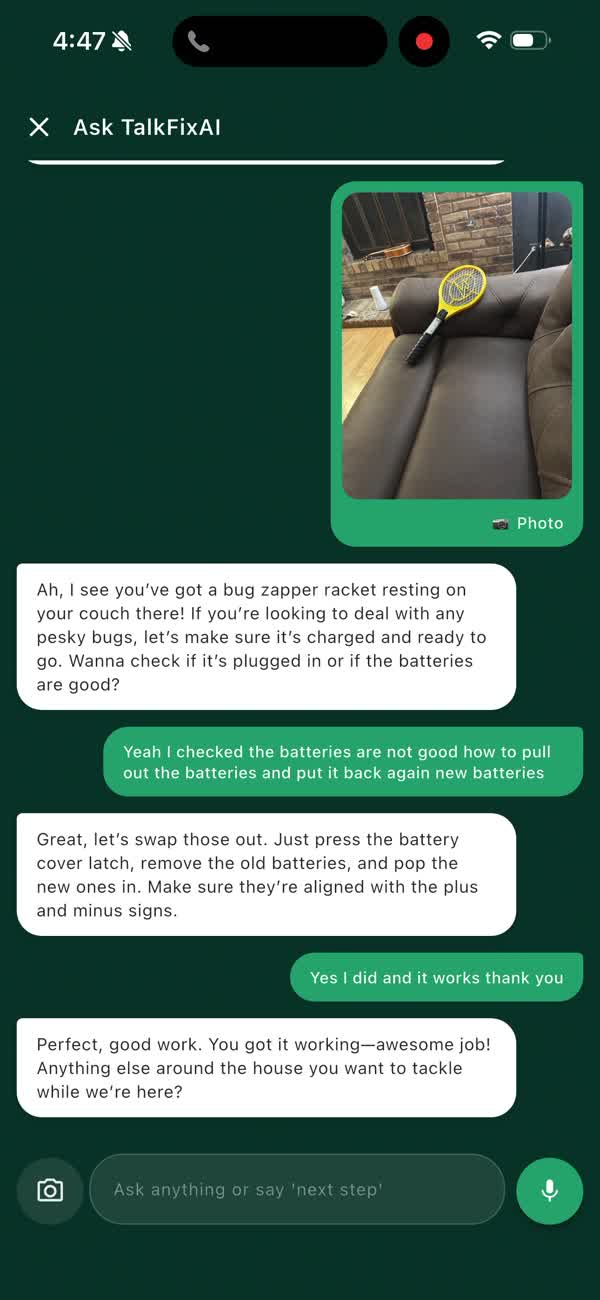
The screenshots below are from a real TalkFixAI conversation about a bug zapper racket. TalkFixAI works the same way for any repair question, including this one.

  1. TalkFixAI recognising a bug zapper racket in a shared photo and asking whether it is charged
    Step 1Show it the problemTap the camera and share a photo. TalkFixAI recognises the bug zapper and asks whether it is charged. Photo analysis needs an internet connection.
  2. TalkFixAI explaining how to replace the batteries after the user reports they are dead
    Step 2Say what you foundReply by voice or text. The batteries are dead, so TalkFixAI explains how to open the cover and swap them.
  3. The user confirming the bug zapper works and TalkFixAI offering to help with the next job
    Step 3Get it workingOne step at a time until it works. Spoken and typed questions also work offline once the on-device AI is set up.

Want TalkFixAI to talk you through this repair hands-free while your hands are busy? Try TalkFixAI, the free repair assistant that answers by voice, even offline.

More Wi-Fi and internet fixes